For this weeks blog post, I am going to provide a detailed history of how my Vaio Z Canvas – my primary laptop at SUNY New Paltz – came into my possession and how it has helped my academic career.
In September of 2015, I was beginning my junior year of high school. One of the courses I was enrolled in was Introduction to Engineering Design (IED), a course focused on Computer Aided Design (CAD) modeling and 3D printing. Prior to the beginning of IED, I had no experience with CAD modeling; while I found the material interesting, I struggled to keep up with the assignments. The software used in the course, Autodesk Inventor, was only available on the computers in the engineering classroom, so if I did not finish my assignment in class or during office hours, I was not able to continue my work outside of the classroom. I tried downloading Autodesk Inventor onto my father’s laptop, but his laptop did not have the appropriate computer hardware to support the program. After a few assignments passed, I decided to make an investment in my education: purchase an affordable, compact laptop, where I could run sophisticated software such as Autodesk Inventor and complete assignments in a timely manner.
After two months of extensive research, I concluded that the Vaio Z Canvas was the laptop I was going to purchase. I choose this unique laptop for a few specific reasons: the performance of the central processing unit (CPU) in executing demanding tasks was remarkable; the graphics card in the computer was, at the time, the best Intel could offer for a non-discrete graphics processing unit (GPU); the utility of having so many accessible ports; and the ability to travel with the laptop without the concern of losing a significant amount of storage space. At the time of the purchase, there were few options on the market for a fast, reliable, and compact 12 inch laptop, so there was little competition in persuading me to purchase another laptop.
As an electrical engineering student, a 3D CAD modeler, and an amateur photographer, I needed a computer that could support any form of sophisticated software – Adobe Lightroom, Adobe Photoshop, MATLAB, Dassault SolidWorks, Autodesk Inventor, and Rhino 6 – to execute demanding tasks (reference Figure 1). Sporting an Intel i7 quad-core Haswell (fourth) generation processor, 8 gigabytes of DDR4 Random Access Memory (RAM), Intel Iris Pro Graphics 5200, and a 256 gigabyte SATA solid state drive (SSD), the internal hardware in the Vaio Z Canvas provided exactly what I needed. For a person who does not know a lot about computer hardware, this information may seem confusing or irrelevant. To put these specifications into perspective, the Vaio Z Canvas can compete head to head with Apple’s 2015 15-inch MacBook Pro, an elegant piece of technology that can easily execute demanding tasks, so for $1200, a $1000 less than the 15-inch MacBook Pro, I immediately jumped on the deal for the Vaio Z Canvas.

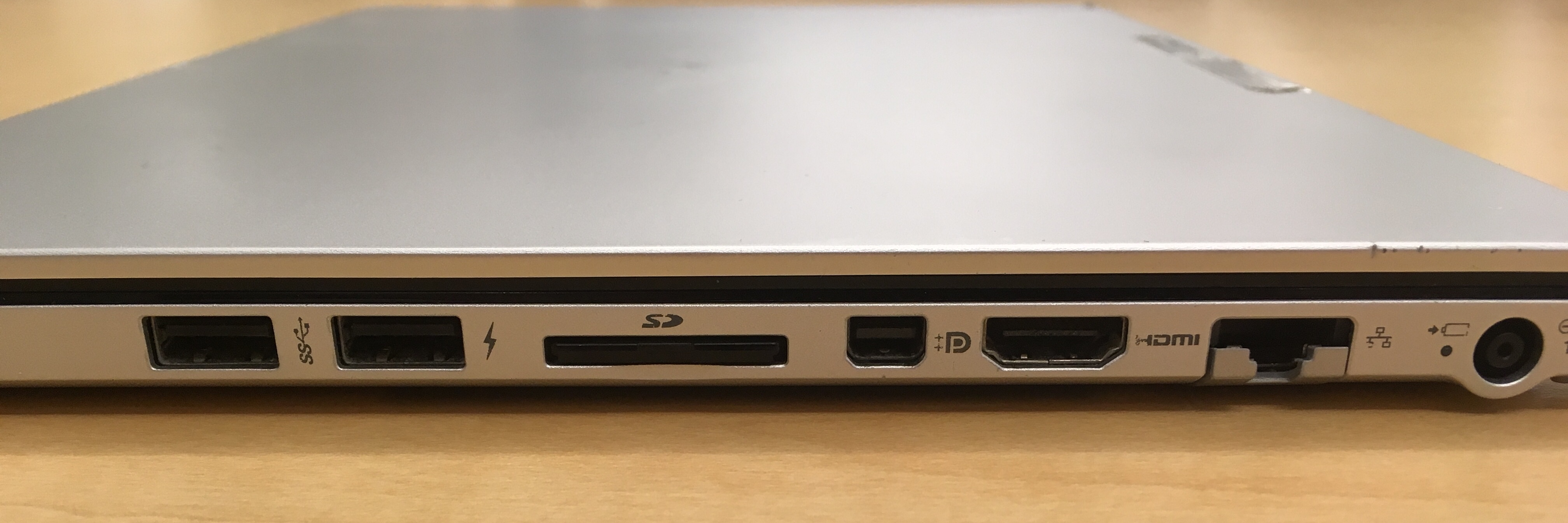
In addition to the hardware persuading me to purchase the Vaio Z Canvas, the ports of the computer were another unique feature. In stark contrast to Apple’s decision to switch to strictly USB C ports on their MacBook Pro line, the Vaio Z Canvas takes a traditional approach when it comes to ports. The Vaio Z Canvas includes two USB 3.0 ports, one full SD card slot, one displayport, one HDMI port, one gigabit ethernet port, and one 19.5 Volt charging port (reference Figure 2). With this wide array of a port selection, I never have to think about buying an adapter, saving me money and space in my backpack. While the Vaio Z Canvas may be slightly thicker and heavier than the 2015 15-inch MacBook Pro, I still value the versatility in having so many ports. Without these ports, I would not be able to project my laptop to two different computer monitors while studying for classes (HDMI and displayport), revise photographs while travelling (SD card slot), quickly transfer CAD files to a 3D printer (SD card slot), or establish a fast, stable connection to the internet (gigabit ethernet). These ports in combination with the computer hardware of the Vaio Z Canvas enable a higher level of productivity.
This past December marked three years since I purchased my Vaio Z Canvas. While there are frustrating issues such as the poor battery life or the small, unresponsive trackpad, I fortunately have no regrets in purchasing this laptop. The Vaio Z Canvas has also helped me in an indirect way: introducing me to digital note taking on Microsoft OneNote. All throughout junior high school, I used five-star subject notebooks, and while I never had an issue with the notebooks, I found that Microsoft OneNote offered a myriad of features – changing different pen colors while using the same pen, offering different font thicknesses while writing, and the opportunity to record a lecture – which a five-star subject notebook simply could not match. This laptop has helped me tremendously throughout high school and college, and I intend to keep using it until the day it stops working.
 The Materials of History, Thought, and Art
Hi Chris,
This was definitely one of the more interesting blog posts I’ve read so far. I’m pretty tech savvy myself, considering I built two computers from scratch using the best parts I could get at the time, so your post really stood out to me. Personally, I’ve never heard of this laptop manufacturer before but I’m glad you’re happy with it and the computer functions well. Too bad they didn’t have a model that included a dedicated GPU from Nvidia because that would definitely help when using CAD programs for modeling and rendering. Overall, it was a great read!
Chris,
I really enjoyed your blog post this week. I am not technologically savy at all, so it was interesting to hear about all of the components going into choosing your computer. However, when I got mine, I just got a mac because I heard they’re reliable and my brother had one. Although you mentioned a few flaws about your laptop, I respect your mindset of having no regrets on its purchase. Nothing is going to be perfect, objects hold a variety of uses and possess a variety of flaws to different people. Objects are what we make of them and how much significance they hold to us, and i’m glad you found the computer that is perfect for you!
Chris,
Intel, huh? I thought as an engineer, you’d know AMD is where its at!
I’m only kidding of course, but in all seriousness I enjoyed your breakdown of all the functional parts of your laptop. It’s pretty interesting to think of a computer as an object because we usually think about it as a single machine, but in reality it’s a collection of functional pieces. That considered, I like how your posts relates each individual port on the laptop to the task it helps you perform. It’d be pretty cool to look at a history of computer ports and their structure and uses over the years.
If it ever does decide to die on you, I’d love to see the inside.